
It can be kind of confusing to purchase Tenorio Volcano National Park tickets on the SINAC website as it is constantly changing and being updated.
Do not worry!
Here is our step by step guide to purchase Tenorio Volcano National Park through the SINAC website for a self guided visit.
Check out our guide to Rio Celeste – Tenorio Volcano National Park to see what the trails are like, the parking situation and our personal recommendations to plan your visit.
What to Know About Tenorio Volcano National Park Tickets
Tenorio Volcano National Park tickets cannot be purchased at the door.
Every visitor has to have park ticket reservations purchased beforehand on the SINAC website.
Tenorio Volcano National Park tickets costs $12 USD for adults and $5 USD for children 2-12 years of age, not including tax. Children under 2 are free.
Residents and nationals cost 800 CRC per adult, 500 CRC per child 2-12 years of age and seniors and children under 2 are free.
The park tickets give you access to the Rio Celeste trail which goes to the waterfall, blue lagoon, boiling mud pots, the river bridges and joining of two river viewpoints.
If you booked a Rio Celeste tour from La Fortuna or a Rio Celeste tour from Guanacaste, then the tour operator is in charge of purchasing your park tickets. They will ask for your full name, passport number and passport country as it is required to purchase the park tickets.
SINAC Website
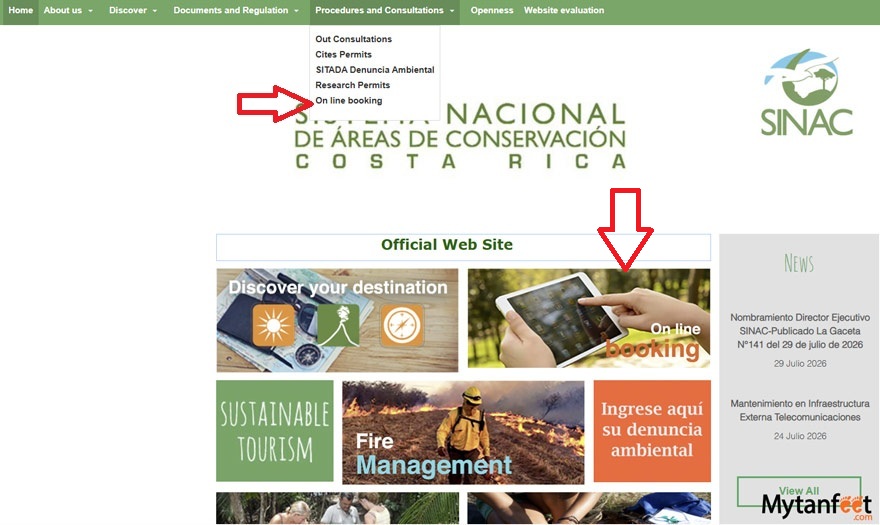
This is the SINAC homepage and website.
On that page, you need to hover over “Procedures and Consultations” and click on “On line booking” or click on the image that says “Online Booking.”
This will take you to the online booking page for national park tickets.
It will then take you to this page “COMPRA Y RESERVA EN LINEA”
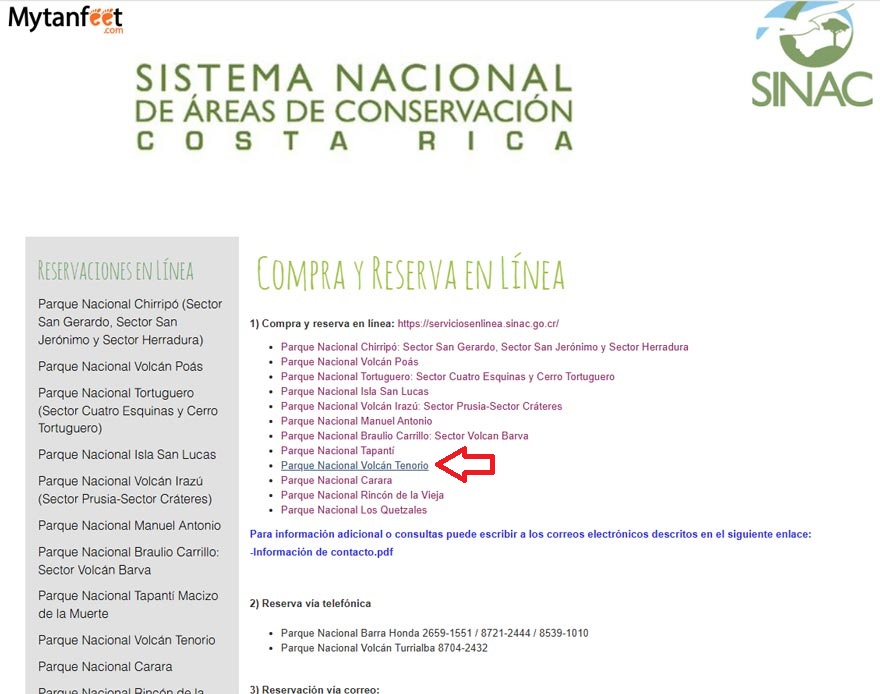
Once you click on Parque Nacional Volcan Tenorio, it will take you to the account page.
Change the language to English on the top right corner blue box.
You MUST create an account in order to purchase national park tickets.
On the very bottom, there is a video tutorial if you click “Tutorial Vistantates” but this is for the old SINAC website and the English is so-so. It will open a Youtube pop up if you click it.
IMPORTANT: in the drop down list under “Availability of National Parks” they currently do NOT have Parque Nacional Volcan Tenorio as an option under “Select Wildlife Area” but don’t worry! Just ignore that box.
Creating Account
For creating your account, enter your username. If there is a box that says “Contain Electronic Invoice” – make sure that box is NOT checked.
Solve the CAPTCHA, accept the Terms and Conditions and click Register.
They will send you two emails. One with the user registration email and the second with your username and a temporary password to log in.
Go back to the SINAC site to the log in page: https://serviciosenlinea.sinac.go.cr/ and enter your username and temporary password.
Once you are logged in, they will ask you to change the temporary password to a new one. After successfully changing the password, click Accept and you will be redirected to the SINAC main page with your account.
You’ll see your complete name, email and last session details on the top when you’ve successfully signed in.
Online Reservation
On the left hand side bar, under “Buy” you now need to click Online Reservation.
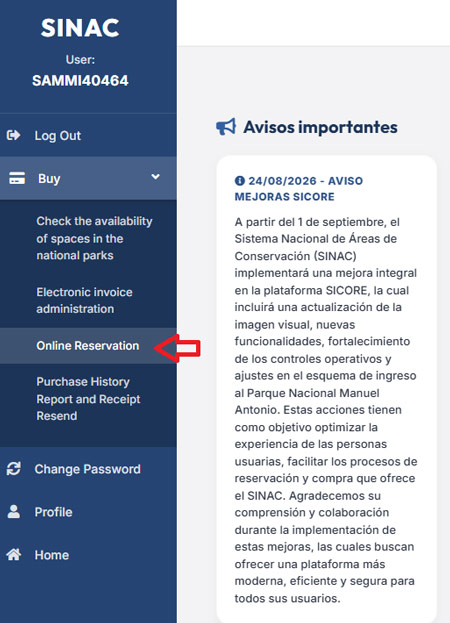
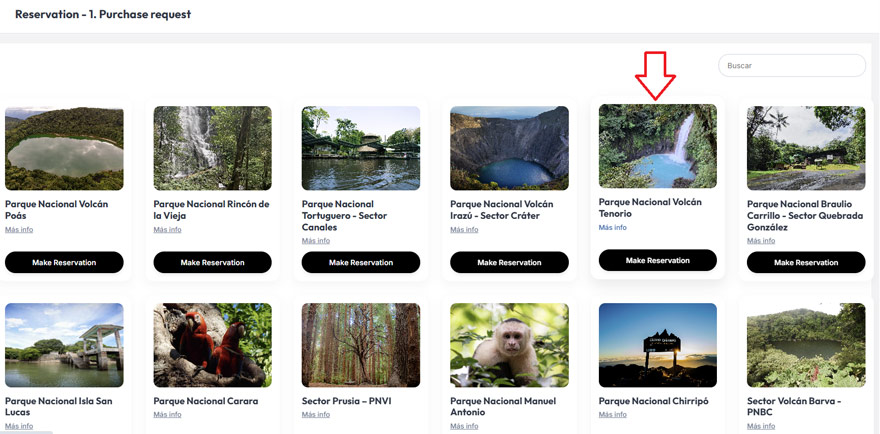
Now, you will be taken to Reservation Step 1 – Purchase request. You’ll see all the national parks available on this page.
Select Parque Nacional Volcan Tenorio “Make Reservation.”
Then it will open this page. Even though I selected English, not everything gets translated, so I wrote in the English in red.
For Horario, you need to select the entrance time you want. You MUST enter the park during the selected time.
If you are late and do not make it, they will not let you in. Exceptions are if it’s low tourism season and it is really slow with not many people.
However, Tenorio Volcano National Park is one of the top five most popular national parks in Costa Rica, so do not be late!
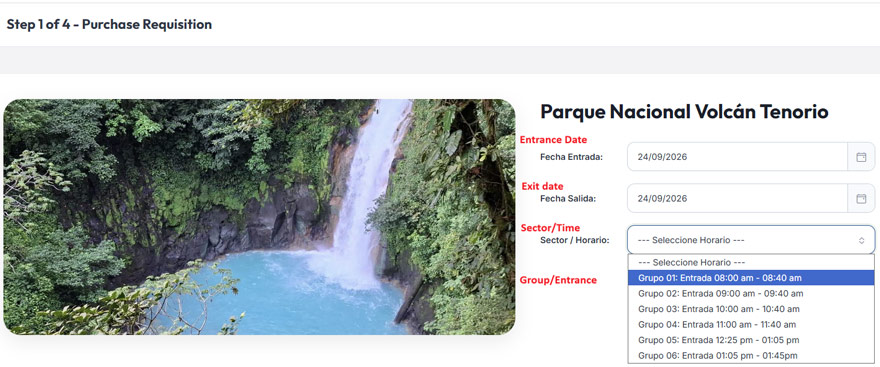
Click “Continuar” in the blue button and then more sections will pop up below.
Admission Tickets
You will only care about the “Foreigners Admission” section. Select the number of adults, children and infants.
Ignore the “Guia Nacional” if you are booking park tickets for a self guided visit. This section is NOT for hiring a guide. These park tickets are for a SELF GUIDED visit.
It is for licensed tour guides when they purchase park tickets for their clients, the guide just pays 800 CRC for their entrance.
Or, if you hired a guide for your time in Costa Rica and you are purchasing park tickets for your visit with that guide, then you will need to select a ticket (800 CRC) for your guide.
Once you have selected the correct number of tickets, they will have the subtotal and total price in Colones and in USD.
Don’t forget to tick the box “He leido y aceptado las condiciones arriba descritas” which means I have read and accepted the above described conditions. You can click on “Ver Terminos y Condiciones” to read the terms and conditions of your park ticket.
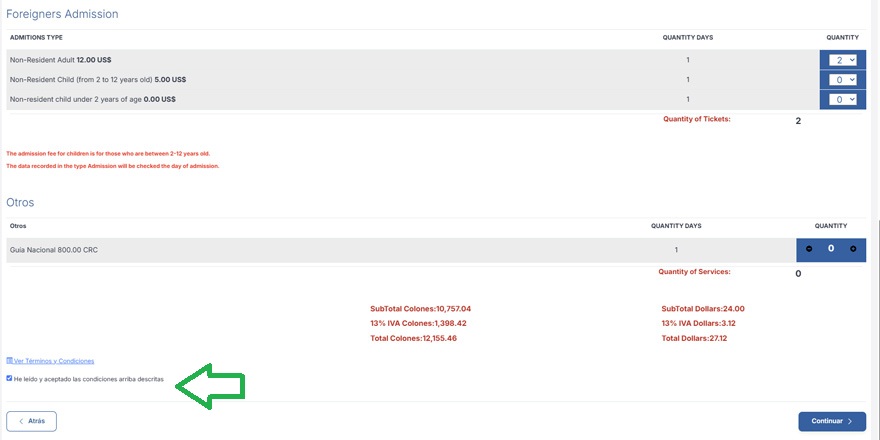
Click “Continuar” and you will have a pop up box with your Standby Time, letting us know how many minutes you have to complete your purchase. It is usually 12 minutes.
Client Information
Now you need to fill in all the information boxes.
Full name as written on your passport
Passport number
Passport Country
Now, enter your credit card details.
IMPORTANT: Make sure to UNTICK the box that says “Contain Electronic Invoice” unless you actually require an electronic invoice. And also complete the CAPTCHA.
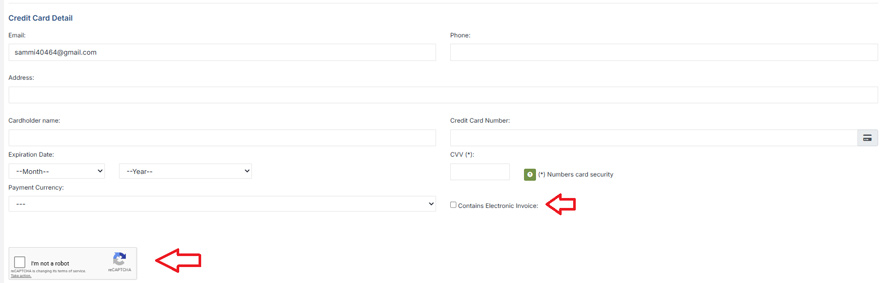
After completion, click “Continuar” and it’ll review all your entered information.
Confirm the payment to click Confirm Payment and it will send the ticket confirmation to the email of your SINAC account.
Email Ticket Confirmation
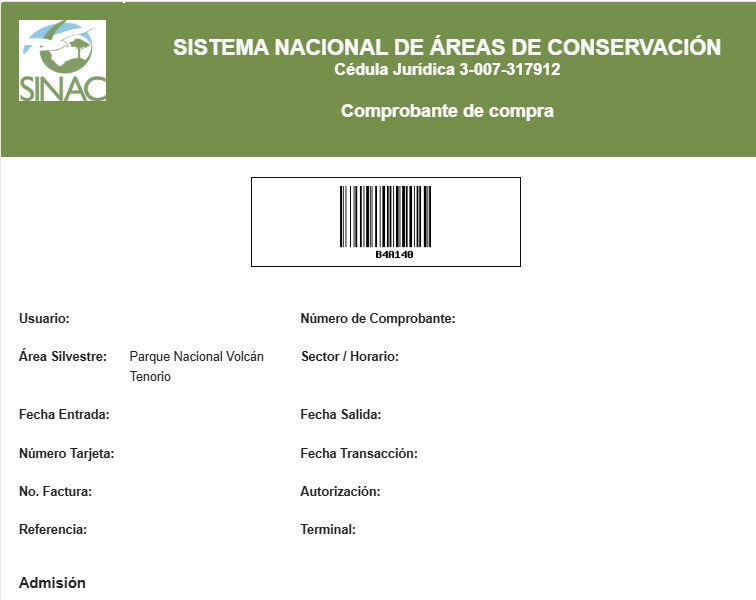
Your email ticket confirmation will have a bar code and all your information. You can print it out or just save it on your phone as a screenshot.
When you enter the Tenorio Volcano National Park main office, the ranger will ask for your ticket. They need to see the barcode and the information with the date, group and your information.
IMPORTANT: Each person must present their passport ID page when checking in. You can show it as a photo on your phone, or photocopy. You don’t necessarily need to bring your original passport.
And that’s it!
Make sure you arrive within your time slot, DO NOT BE LATE!
The national park ticket does not include parking, which is to be paid in cash directly to the parking attendant (3000 CRC).
Tenorio Volcano National Park Quick Info
- Single use plastics are not allowed in the national park so bring an insulated reusable water bottle.
- No facilities inside the national park. Only bathroom is at the park entrance.
- No paper maps available.
- No pets allowed in the national park. Only service animals.
- No strollers allowed.
- ~6 kilometer walk total (~3.7 miles) linear trail.
- Rainy tropical climate, so plan for humidity.
- Best to have sneakers or sturdy walking/hiking shoe. Do not recommend open toed sandals, unless you are an experienced hiker with no mobility issues.
- Check our Mytanfeet Amazon storefront for our personal recommendations on mosquito repellent, sunscreen, clothing, shoes and more!
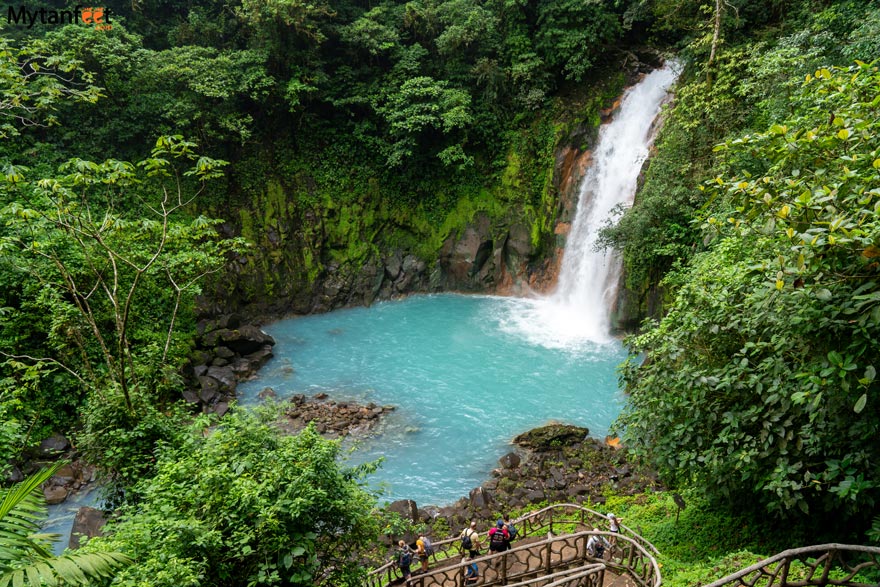
Have a great time at Tenorio Volcano National Park to see Rio Celeste!
Related Tips and Guides
Los Quetzales National Park: The Lesser Visited Cloud Forest Park
Protecting 50,000 square kilometers of cloud forest, the Los Quetzales National Park is home to a variety of…
Read guide
Palo Verde National Park – One of the Best for Wildlife Watching
Palo Verde National Park is an extremely important area in Costa Rica as it encompasses over 45,000 acres…
Read guide
Rincon de la Vieja National Park – Mud Pots and Waterfall Hikes
Rincon de la Vieja National Park, home to the active Rincon de la Vieja volcano offers visitors a…
Read guide
Leave a comment